Projeto TI
Headlines News :

.

Latest Post

Researchers: Oracle’s Java Security Fails

Written By x86_g on 2013-09-05 | 12:44 PM

Faced with an onslaught of malware attacks that leverage vulnerabilities and design weaknesses in JavaOracle Corp. recently tweaked things so that Java now warns users about the security risks of running Java content. But new research suggests that the integrity and accuracy of these warning messages can be subverted easily in any number of ways, and that Oracle’s new security scheme actually punishes Java application developers who adhere to it.
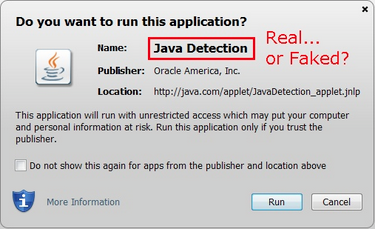
Java's security dialog box.
Java’s security dialog box.
Running a Java applet now pops up a security dialog box that presents users with information about the name, publisher and source of the application. Oracle says this pop-up is designed to warn users of potential security risks, such as using old versions of Java or running applet code that is not signed from a trusted Certificate Authority.
Security experts differ over whether regular users pay any mind whatsoever to these warnings. But to make matters worse, new research suggests most of the information contained in the pop-ups can be forged by malware writers.
In a series of scathing blog posts, longtime Java developer Jerry Jongerius details the various ways that attackers can subvert the usefulness of these dialog boxes. To illustrate his point, Jongerius uses an applet obtained from Oracle’s own Web site — javadetection.jar — and shows that the information in two out of three of its file descriptors (the “Name” and “Location” fields) can be changed, even if the applet is already cryptographically signed.
“The bottom line in all of this is not the security risk of the errors but that Oracle made such incredibly basic ’101′ type errors — in allowing ‘unsigned information’ into their security dialogs,” Jongerius wrote in an email exchange. “The magnitude of that ‘fail’ is huge.”
Jongerius presents the following scenario in which an attacker might use the dialog boxes to trick users into running unsafe applets:
“Imagine a hacker taking a real signed Java application for remote desktop control / assistance, and placing it on a gaming site, renaming it ‘Chess’. An unsuspecting end user would get a security popup from Java asking if they want to run ‘Chess’, and because they do, answer yes — but behind the scenes, the end user’s computer is now under the remote control of a hacker (and maybe to throw off suspicion, implemented a basic ‘Chess’ in HTML5 so it looks like that applet worked) — all because Oracle allowed the ‘Name’ in security dialogs to be forged to something innocent and incorrect.”
Oracle has not responded to requests for comment. But Jongerius is hardly the only software expert crying foul about the company’s security prompts. Will Dormann, writing for theCarnegie Mellon University’s Software Engineering Institute, actually warns Java developers against adopting a key tenet of Oracle’s new security guidelines.
Oracle recommends that all Java applets be cryptographically signed regardless of the privileges required by the program. Unsigned Java applets will run within a web page with a scary red warning that, “Running this application may be a security risk.” One of Java’s most-touted features is a “sandbox” security mechanism that is supposed to prevent certain functions when the applet is sent as part of a Web page. But according to both Jongerius and Dormann, Oracle made the default behavior for signed code to be full access to the computer (essentially, negating the usefulness of the sandbox).
“What about Oracle’s vision of a Java future where every Java applet is signed?,” asks Dormann, a longtime security research with the Department of Homeland Security’s US Computer Emergency Readiness Team (US-CERT). “What this vision means is that every Java applet, which would be signed, would also now be in a state where it could be repurposed because it is now no longer restricted by the sandbox. A poorly designed sandboxed Java applet can’t do much of anything.  However, a poorly designed signed Java applet can do pretty much anything that native code can.”

How to hex a malware and make a builder (VB6/ASM source code incl)

Written By x86_g on 2013-08-07 | 1:49 PM

Hello TF,
I got time to kill and after seeing this thread i got the idea to write.
So here is a tutorial about "How to hex a malware and make a builder"
When malware writers give only bins and no builder, the only way to fuck them up is to codecave the bin for make it do what we want.
Sometime that can be complicated like here
But you have many advantages, because you can remove bugs, add features... you are free.
For make this, you will need: Ollydbg, an editor hexadecimal and a minimum of intelligence.
For the coding part i've choose 2 languages: Visual Basic 6 and Assembly with MASM32 and WinASM as IDE (two extreme, one high and one low-level language)

So let's start.
The first step is to locate things you need to modify inside the malware (e.g: gate urls, timers, enc keys)
For malware, do to ethical issue i will chose a simple unNagMe coded fastly in ASM, and like that you can try to modify things without the fear of being infected.


This executable can be downloaded with both sources code in attach.

Run Ollydbg and load the executable inside to have a look and see what the code look's like


Pretty simple with a good zone of zero filled bytes, and we see strings are pointing to 0x403000 and 0x403023
We need to find a zone with enought nullbytes to insert our url, the zero filled place on the screenshot can be good but i've choose to add my strings under original one.
This green place can be good and used, i've used HexDecCharEditor to find it:


Now that we have found a place for our URL we need to modify the executable to make it go on our string.

(843, VA=0x403043)
Double click on the line and modify the code, then: Right Click>Copy to executable>All modification
A window appear: Click 'Copy all' then another window appear, right click on it and click "Save file".

Everything is cool now.
We just need to code a program who will edit our binary at 0x403043
For that i will modify some of my old VB6 and ASM codes

Basic interface:


Please note that for Visual Basic i've used a commonDialog mean the program is dependent of one ocx: COMDLG32.
The code for boths are a bit hardcoded and can be improved but that work and it's enought for me.
One the file is builded the hexed version is named "Malware.exe.ViR"


The end.
Don't hesitate to show examples of codes if you are motivated.
No password on archive because nothing is infected.
And if you want some fun InjectMe #1InjectMe #2.

Maybe u need TrojanForge ACC to download ---** 

PHP EXIF Backdoors generator using custom shellcode

PHPEB is a small tool that generates and stores obfuscated shellcode in user specified EXIF handlers. The backdoor is divided into two parts. The first part is a mix of the exif_read_data function to read the image headers and the preg_replace function to execute the content and the second is the real payload obfuscated in EXIF a JPG/TIFF file headers.

Both functions are harmless by themselves. Exif_read_data is commonly used to read images and preg_replace to replace the content of strings. However, preg_replace has a hidden and tricky option where if you pass the “/e” modifier it will execute the content (eval), instead of just searching/replacing.

Another interesting point is that the image that we generate still loads and works properly.

Started from Sucuri Research.

If you have any other cool ideas for obfuscating the shellcode, feel free to commit.

Details: https://github.com/CCSIR/PHP-EXIF-Ba...stom-shellcode

LE: Can anyone move this thread to PHP & Python & Perl or in any other place that will fit better? Thank you

Chrome’s insane password security strategy


Chrome does something interesting when you first run it.
import
The other day, I was using Chrome in development for an Ember.js app. I use Safari for day-to-day browsing, but it has a habit of aggressively caching files when I least expect it, so from time to time I switch to Chrome.
I decided to hit Chrome’s “Import bookmarks now” link and see whether I could import my bookmarklets from Safari, so things would be nice and consistent between the two browsers. I didn’t expect this:
Chrome asking me to import my content from Safari
This struck me as particularly odd. Why is “Saved passwords” greyed out, and mandatory? Why have a check-box? This is the illusion of choice. I think it’s deeply misleading, and this is why:
This is a page in Chrome’s settings panel:
Passwords in Chrome
See that “show” button? It does what you think it does.
Passwords in Chrome, in plain-text
There’s no master password, no security, not even a prompt that “these passwords are visible”. Visit chrome://settings/passwords in Chrome if you don’t believe me.
There are two sides to this. The developer’s side, and the user’s side. Both roles have vastly different opinions as to how the computer works. Any time I try to draw attention to this, I get the usual responses from technical people:
  • Just use 1Pass
  • The computer is already insecure as soon as you have physical access
  • That’s just how password management works
While all of these points are valid, this doesn’t address the real problem: Google isn’t clear about its password security.
In a world where Google promotes its browser on YouTube, in cinema pre-rolls, and on billboards, the clear audience is not developers. It’s the mass market - the users. The overwhelming majority. They don’t know it works like this. They don’t expect it to be this easy to see their passwords. Every day, millions of normal, every-day users are saving their passwords in Chrome. This is not okay.
"A Google Chrome prompt showing the words 'confidential information', and 'in your keychain'
This dialog is even more misleading. By using words like “confidential information” and “stored in your keychain”, OSX describes the state of your saved password’s current security. It’s the very security Chrome is about to bypass, by displaying your passwords, in plain-text, outside your keychain, without requiring a password. When you visit a website, Chrome prompts for every password it can find for that domain.
Today, go up to somebody non-technical. Ask to borrow their computer. Visitchrome://settings/passwords and click “show” on a few of the rows. See what they have to say.
I bet you it won’t be “That’s how password management works”.
Update: Justin Schuh, head of Chrome security, says I’m wrong, and that this is not going to change.

Welcome to ArdOS, the Arduino Operating System

Written By x86_g on 2013-08-05 | 6:18 AM

Thank you for dropping by. This version of ArdOS is now deprecated. For the latest versions please mosey over to ArdOS IDE. The new ArdOS features:
  • Convenient import into the Arduino IDE.
  • Automatic creation of task stacks.
  • Task stack size configurable at run-time.
  • Number of tasks configurable at run-time.
  • Full support for the Arduino library. Now Serial, attachInterrupt, etc. are available for you to use!
  • Simplified configuration file.
  • Simplified set of headers.
If you are using the older version of ArdOS on this site and would like to see it continue being supported, please drop me a mail.
----------------------------------------------------------------------

GET THE SOURCE:
demo
include
source
34.3 KB
New distribution update
7.5 KB
New distribution update

Configuring a WindowMaker desktop in Ubuntu

Ubuntu Linux comes with a variety of desktops, including GNOME, KDE, and XFCE – all supported in their own distributions. You can install any of these by selecting the appropriate packages: either ubuntu-desktop,kubuntu-desktop, or xubutnu-desktop respectively. There are, however, other desktops not as well supported such as Window Maker (I’ve just got to discuss 9wm sometime…).
Before discussing too much, note that Window Maker is currently not in active development, and a fork calledwmaker-crm has taken on active development for Window Maker. However, there are no packages for wmaker-crm in the Ubuntu repositories; to actually use wmaker-crm you’ll have to build it from source.
Creating a complete and working Window Maker desktop is not hard, but it is not straight-forward, nor documented well. There are a number of things to do which will enhance the desktop.
First, make sure that the menu package is installed. If it isn’t, most of the applications you have installed will be missing from the Window Maker application menus. Install it from your choice of package installers, or from the command line:
apt-get install menu
there are no applets running when you first start out. There are a number of good applets in the repositories; I selected these:
  • wmforkplop
  • wmhdplop
  • wmbattery
  • wmdiskmon
  • wmclockmon
  • wmcpuload
  • wmmemload
  • Mixer.app
  • wmwave
Install these with synaptic or with this terminal command:
apt-get install wmforkplop wmhdplop wmbattery wmdiskmon wmclockmon wmcpuload wmmemload mixer.app wmwave
Get the applets started by starting them at the command line with the appropriate options:
wmforkplop &
wmhdplop &
wmbattery &
wmdiskmon -p /dev/sda7 -p /dev/sda1 -p /dev/sda6 &
wmclockmon &
wmcpuload &
wmmemload -b -c &
Mixer.app &
wmwave &
Be sure to adapt the options to your liking; most likely the only change will be the partitions listed in the wmdiskmon options – for me, these partitions are /, /boot, and /home respectively.
Note that Mixer.app (nor almost any other mixer) will not work in Ubuntu 10.04 and above as the sound daemons it depends on have been removed. That sound system is called OSS, and it has been removed from the Ubuntu kernels entirely. To fix this, you have to compile your own kernel. If you are technically savvy, this will not be too difficult. If you follow some good instructions, you’ll be alright.
The Ubuntu repositories have many more dock apps. If that isn’t enough, there are even more at dockapps.org - including, for instance, a Mixer.app that works with ALSA sound drivers instead of OSS.
You’ll probably want to add multiple desktops. Right-click on the desktop, then select from the menu the optionWorkSpace, then Workspaces, then New – and create as many as you like.
The Clip – found at the top left of the screen – is quite handy, but doesn’t provide much without some configuration. To have the Clip automatically consume any running application icons, right-click on the Clip and select Clip Options, then Autoattract Icons. You may also like to have the icons disappear automatically, only to reappear when the mouse hovers over the Clip: select Autocollapse in the Clip options menu.
To tweak even more options, use the Window Maker Preferences application – this is found in the panel with a screwdriver on it. Double-click and prepare to spend a lot of time – though not many options need to be changed.
The desktop appearance and theme can be changed; right-click on the desktop, then select WorkSpace, thenAppearance. If you are going to try out a lot of themes and backgrounds, click on the Appearances menu title bar or drag the menu using the title bar to a place of your choosing – then right-click on the desktop. The Appearances menu will stay on the desktop as long as you like; close it like any other window by clicking on its close button.
Backgrounds are normally stored in ~/GNUstep/Library/WindowMaker/Backgrounds or in /usr/share/WindowMaker/Backgrounds. You can quickly set a background from the command line by using this command:
wmsetbg -u myfile.jpg
There are many more options for wmsetbg in its man page.
GNOME applications will have a generic GTK display; most likely, you’ll want to change this. This can be fixed by using the gnome-settings-daemon. However, the gnome-settings-daemon will want to manage your background as well; use the gconf-editor program to fix this; go into /apps/gnomesettingsdaemon/plugins/background and change the active key to false by clicking on (and clearing) the checkbox. You can also use gconftool-2 at the command line:
gconftool-2 --set /apps/gnome_settings_daemon/plugins/background/active --type bool False
To use the gnome-settings-daemon, put it into the ~/GNUstep/Library/WindowMaker/autostart file. This file will handle automatic startup of programs that either don’t recognize an X session or that are daemons. Here is the one that I use:
#!/bin/sh

xset mouse 20/10 4
gnome-settings-daemon &
dropbox start &
Window Maker will not finish starting until this script is complete, so long running applications should be backgrounded.
If you like shadows, you might want to use the package xcompmgr. Run it from your autostart file with a command like:
xcompmgr -C -c -r 8 -t -12 -l -12 &
A problem with xcompmgr is that it hasn’t been updated in quite a long time – and there is talk that it has memory leaks and other bugs. An alternative is the Cairo Composite Manager, although it is not in the Ubuntu repositories. One benefit of the Cairo Composite Manager is that it will use the 3D capabilities of your video card if it has them.
If you want transparency, then load the transset-df package. This package will set transparency of specific windows, but may have bugs and other problems – it hasn’t been updated in many years. Use it like this:
transset 0.7
This will set a transparency of 0.7 (70%) on the window that is clicked. You can select windows by using the -noption which will set transparency of windows with an associated name – for instance, -n Terminal will make all Terminal windows transparent by the specified amount. However, in my experience, using transset resulted in some windows not displaying correctly – the colored terminal window became gray and was not transparent; your experience may differ. There may also be bugs in transset; caveat emptor.
One thing missing from the Window Maker desktop is the ability to control networking interfaces. To fix this, you’ll have to stop the network-manager service as it doesn’t work with Window Manager, and replace it with the wicdpackage:
sudo service network-manager stop
sudo mv /etc/init/network-manager.conf /etc/init/network-manager.conf.noboot
sudo apt-get install wicd wicd-daemon wicd-gtk python-wicd
sudo service start wicd
wicd-client -n
Configure the network options as you desire. You’ll most likely want to keep the icon for this application around for easy access; if it is under the Clip, then right-click on the icon and select Keep Icon.
Unfortunately, there is no decent front-end for VPNs such as OpenVPN. The way to start a VPN remains the command line, at least until wicd supports VPNs.
Now having gone through this, you’ll have yourself a much nicer Window Maker desktop to work with. Have fun!
Update: I forgot to mention how to set up good icons. Window Maker will automatically choose an icon, and often its not a good choice: either the icon is low resolution and jaggy, or too big and only part of it can be seen.
Cached icons are stored in ~/GNUstep/Library/WindowMaker/CachedPixmaps/. You can find better icons by search with the locate utility – in Ubuntu, many icons can be found in /usr/share/icons/hicolor/ – and if there is a 48×48 or 64×64 icon conversion will not be necessary; just copy the file to the CachedPixmaps directory and change the icons location to the new file: right-click on the icon in the Clip (or wherever), select Settings… and change the location listed for the icon.
If you can’t find a 48×48 or a 64×64 you’ll have to convert the image: use the convert utility to do this:
convert orig-icon.png -resize 48x48 new-icon.png
You can also convert formats with convert; check its man page for details.
One more thing: here is my current desktop:
My Current WindowMaker Desktop
Just in case anyone asks… Wikipedia describes R.O.D the TV well.

Ubuntu - G0t Hacked -

Hello Ubuntu Studio developers, contributors and users,
This is an emergency announcement.
The Ubuntu Forums is currently down for maintenance, including Ubuntu Studio’s sub-forum.
At 20th July, 2013 20:31 UTC, Canonical IS discovered that hackers have attacked the Ubuntu Forums, and has got hold of every users’ username and password. The Ubuntu Forums is down for maintenance 4 minutes later.
Canonical IS are trying to recover the service as soon as possible. Other Ubuntu services are not affected.
Please see https://ubuntuforums.org/announce/
If you are a Ubuntu Forums Ubuntu Studio sub-forum user, here are some suggestions on what you need to do.
1. Please change every password that is the same as your Forums account as requested by the Ubuntu Forums.
2. Please use other support channels to receive support. You can find support in the Ubuntu Studio user IRC channel (#ubuntustudio), Ubuntu Studio User and Support mailing list (ubuntu-studio-users@lists.ubuntu.com) or Ask Ubuntu (https://askubuntu.com).
Thank you for your attention.
Regards,
Howard Chan (smartboyhw)
Ubuntu Studio Release Manager

Arduino vs. Raspberry Pi vs. CubieBoard vs. Gooseberry vs. APC Rock vs. OLinuXino vs. Hackberry A10

Arduino vs. Raspberry Pi vs. CubieBoard vs. Gooseberry vs. APC Rock vs. OLinuXino vs. Hackberry A10

Arduino vs. Raspberry Pi vs. CubieBoard vs. Gooseberry vs. APC Rock vs. OLinuXino vs. Hackberry A10
A long time ago, Earth was ruled by dinosaurs. Then they died and we began to play with Motorola HC11.
These were prehistoric times, when debugging involved anoscilloscope. (Yes, I am that old.)
Then Massimo Banzi invented a new single boardArduino.
And everyone was happy. At last, prototyping was easy, cheap, and fast.
Then the unexpected happened: David Braben invented the Raspberry Pi. Everyone became happier. Prototyping became easier, cheaper, and faster.
The story does not end here: now we have CubieBoardGooseberryAPC RockOLinuXino,Hackberry A10et caetera.
Each one of them is different. Here is how:
PDF filePDF file
Board namePriceVersionLicenceCommunityDocsProcessorClock SpeedSoCGPURAMMemoryMax MemoryGPIOAnalog InAnalog OutUSBUSB hostEthernetWifiHDMIVGAVideo outSDµSDAudio outAudio Line InMic. InSataInfraredLinuxAndroidAndroid Play Store
Arduino Uno$2720€Rev 3CC BY-SA 2.5HugeHugeHugeVery GoodATmega32816Mhz//2KB32KB32KB146No1OptionalOptionalOptionalNoNoLCD out via GPIOOptionalOptionalVia GPIONoNoNoVia GPIONoNoNo
Arduino Due$5339€Rev 1CC BY-SA 2.5GrowingVery GoodAT91SAM3X8E85MHz//96KB512KB512KB5412211OptionalOptionalNoNoLCD out via GPIOOptionalOptionalVia GPIONoNoNoVia GPIONoNoNo
Raspberry Pi, model B$3526€Rev 2?HugeHugeHugeOKARM11700MHzBroadcom BCM2835VideoCore IV512MBNone32GB via SD26NoNo2NoYesOptionalYesNoCompositeYesYesNoNoNoNoYesNot stableNo
CubieBoard$4936€Rev 1?GrowingOKARM Cortex-A81GHzAllwinner A10ARM Mali-4001GB4GB NAND flash32GB via SD96NoNo21YesOptionalYesNoNoYesYesYesNoYesYesYesYesYes
Gooseberry$6346€Rev 1?GrowingOKARM Cortex-A81GHzAllwinner A10ARM Mali-400?4GB NAND flash32GB via SDNoneNoNo01YesYesYesNoNoYesYesNoNoNoNoPossibleYes?
APC Rock$7959€Rev 1?GrowingOKARM Cortex-A9800MHzWondermedia Prizm WM9950ARM Mali-400512MB4GB NAND flash32GB via SD24NoNo21YesOptionalYesYesNoYesYesNoYesNoNoPossibleYesNo
A13 OLinuXino Wifi$7455€Rev. ECC BY-SA 3.0GrowingVery GoodARM Cortex-A81GHzAllwinner A13ARM Mali-400512MB4GB NAND flash32GB via SD68/74NoNo31Via UEXT ModulesYesNoYesLCD OutYesYesNoYesNoNo?Yes?
A10 OlinuXino??TBACC BY-SA 3.0Growing?ARM Cortex-A81GHzAllwinner A10ARM Mali-4001GB4GB NAND flash32GB via SD132NoNo21YesOptionalYesYesLCD OutYesYesYesYesYesNo?Yes?
Hackberry A10$6548€Rev 1?GrowingOKARM Cortex-A81.2GHzAllwinner A10ARM Mali-4001GB4GB NAND flash32GB via SDNoneNoNo20YesYesYesNoCompositeYesYesNoYesNoYesYesYes?
If you see any error in this, please feel free to leave a comment below.
If you want to play it safe, you should probably go with an Arduino or a Raspberry Pi.
If you are more audacious, it will depend on your need.
I like the CubieBoard a lot, even if its GPIO pins are 2mm (really painful…) instead of the usual 2.54mm (1/10 inch).
The A10 OlinuXino seems to be very promising.
Arduino vs. Raspberry Pi vs. CubieBoard vs. Gooseberry vs. APC Rock vs. OLinuXino